INTERACTIONFQM

Feedback & reputation

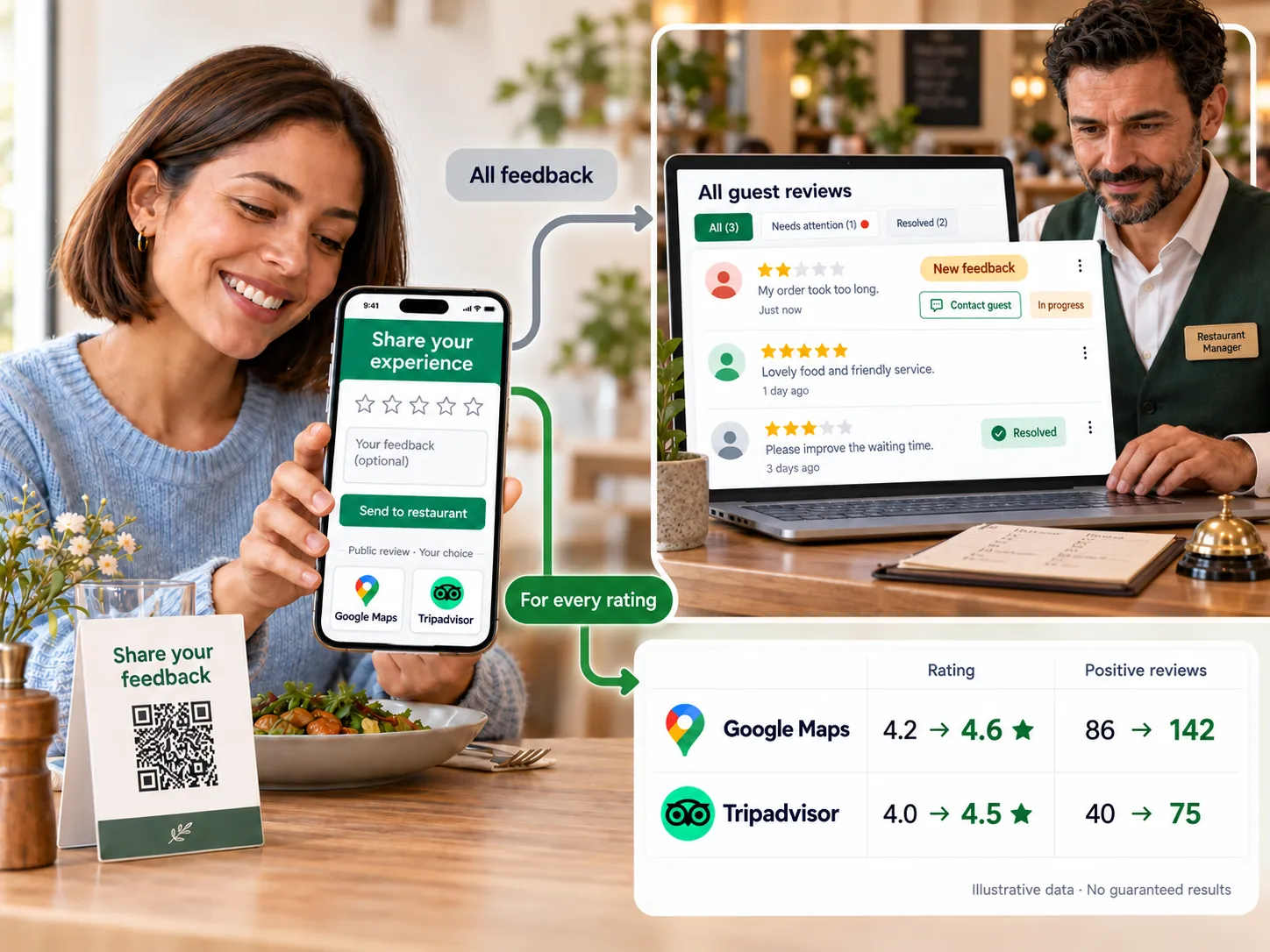
Collect feedback through channels convenient for guests, track ratings across venues and help your team respond promptly.

Feedback & reputation — Collect feedback through channels convenient for guests, track ratings across venues and help your team respond promptly.

What it brings to your venue

The team sees enquiries and can respond to problems, while owners compare results over time and across venues.

For owners

Configure forms, recipients and reports. Use analysis to support staff, not replace review of their replies.

For guests and your team

Guests can leave feedback anonymously or provide contact details; the team receives it through the chosen channel.

How it works

  1. The guest leaves feedback

  2. The team receives a notification

  3. The responsible person reviews the issue

  4. The owner monitors results

Module features

Convenient ways to collect reviews

  • CSAT, NPS, CES and custom survey forms, with smileys, stars, hearts, likes or rating scales
  • Configurable screens and messages after positive, neutral and negative ratings help thank guests or clarify a problem.
  • Guests can leave feedback anonymously or provide a name, phone number or email; the form includes venue selection
  • Photos and voice messages attached to reviews
  • Collection channels: QR sticker, link, email, SMS and website widget
  • A review prompt after payment in the QR menu; the waiter immediately sees the rating and text
  • A Report a problem button on every screen

One dashboard and prompt responses

  • Reviews from Google, Tripadvisor, 2GIS and Yandex in one dashboard
  • Instant new-review alerts via Telegram, Viber, WhatsApp, email, Slack and the mobile app, based on rating type
  • Response-time monitoring: a reminder if a negative review has not been answered on time
  • For restaurant groups: reviews and metrics for every venue on one screen
  • Send new reviews to CRM via a webhook

Analytics and recommendations

  • Scheduled review reports: daily, weekly, monthly, quarterly, half-yearly or annually
  • AI review analysis: likely causes, possible consequences of no response and a draft reply
  • Automatic sentiment analysis of each comment and a cloud of positive and negative phrases
  • Dashboard: CSAT and NPS by day, hour and venue, with period comparisons
  • CES and PMF metrics alongside CSAT and NPS

Reviews on the venue website

  • Reviews section on the venue website

Setup and conditions

  • Feedback form and collection channels
  • Responsible staff and response deadlines
  • Verified external sources

Do not make rewards conditional on positive ratings. Invitations to external review platforms are configured and checked separately.

Frequently asked questions

Does AI respond on behalf of an employee automatically?

An AI draft helps prepare a response. Its content and sending must be supervised.

Can guests leave feedback without a name?

Yes. The form can accept anonymous responses.

See how it works for your venue

We will review your processes, demonstrate the features you need and help you choose modules. Setup and team training are free. Test the solution for 14 days, then decide whether to move to a paid plan.

Book a demo
Works with this product

See how the platform can work for your venue

In 20 minutes, we will show the features relevant to your business and answer your questions. Then we can discuss a 14-day free trial, with no deposit or obligation.

Book a demo